Points & Rewards
How to check and use your Dr. Westin Childs points
Your points apply automatically at checkout. Here is where to find your balance, what you will see at checkout, and how points work with a coupon code.
Verified against the live checkout on September 17, 2026
How it works
The current points program
These are the current earning, redemption, and expiration settings. For a full overview, visit the Dr. Westin Childs Rewards Program.
Find your balance
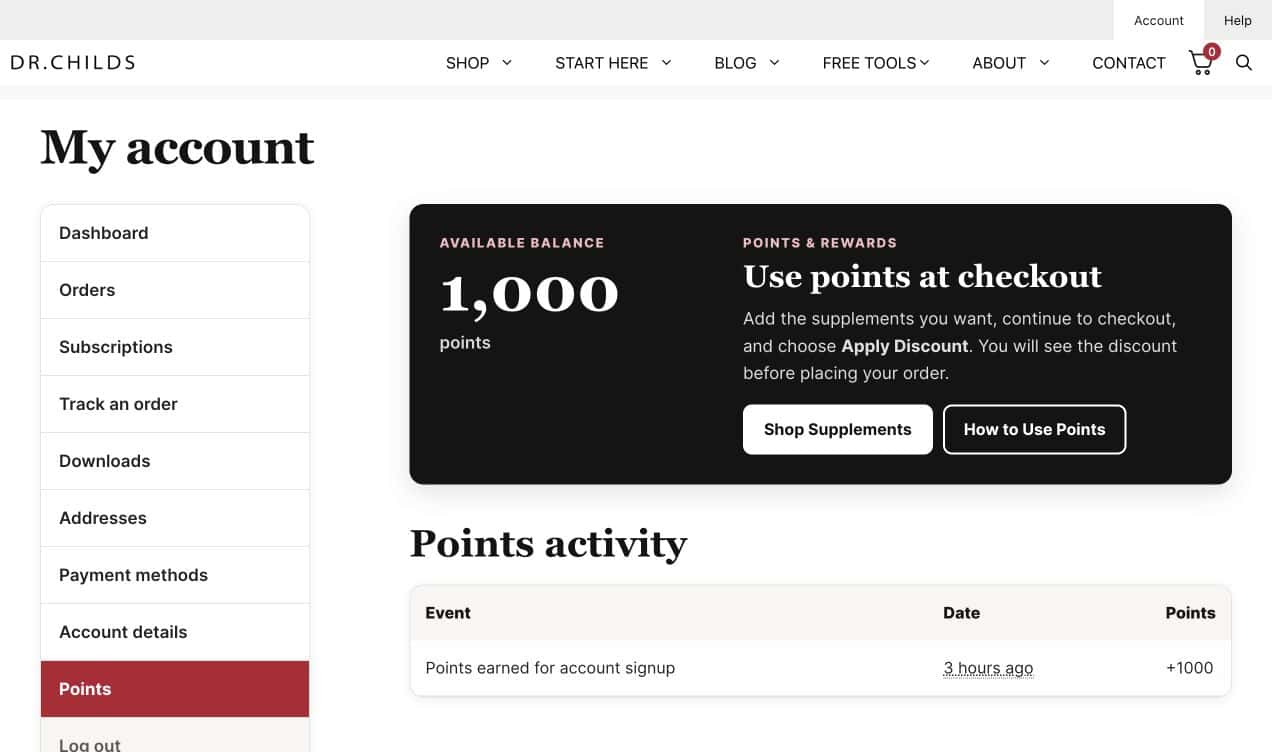
Sign in and open Points
Go to your Dr. Westin Childs account and select Points from the account menu. The page shows your current balance and a history of the points you have earned or used.
At checkout
Your points are already applied
Shop normally and continue to checkout. If you are signed in and have at least 100 points, the discount is already on your order. In the order summary you will see a line that says Use my $X in reward points with the switch turned on, and a Reward points discount in your total.
Want to save your points for a bigger order? Turn the switch off. Your points stay in your account.
Using a coupon code
One discount per order
If you enter a coupon code, your points switch off for that order and stay in your account for next time. The checkout tells you this right under the coupon field.
If you would rather use your points, turn the switch back on and the code comes off.
Common questions
Points FAQ
When will points from my purchase appear?
Purchase points are added after payment is completed and the order reaches an eligible paid or completed status. They may not appear the moment an order is first submitted.
How many points do I earn for a product review?
1,000 points for a review, 1,500 with a photo, or 2,000 with a video. The points are added to your account on their own once your review is in, the first time you review each product. Leave the review under the same email address you order with so it matches your account.
Do points expire?
Yes. The current setting expires points six months after they are granted. Your points history shows when points were added to your account.
What happens to my points after a refund?
Points earned from a refunded or canceled order may be removed. Points that were redeemed on an order are normally returned when that order is canceled or refunded.
Can points be used on an automatic subscription renewal?
Points are not automatically applied to scheduled subscription renewal payments. When a renewal is completed manually, the checkout may offer the option to apply available points.
Can I use a coupon code and my points on the same order?
No. Only one discount can be used per order. If you enter a code, your points switch off for that order and stay in your account. Turn the switch back on if you would rather use the points.
Why do I not see my points at checkout?
First confirm that you are signed in and that your Points page shows at least 100 points. Then continue to checkout with an eligible product. If the switch is still missing, contact us and include the email address used for your account.
Customer support
Still need help with your points?
Send us the email address connected to your account and a short description of what you are seeing. A real person will help you sort it out.
Email Customer Support