Thyro Hair Light guide
Your first session, your routine, and help when something isn’t working. Read the full guide right here.
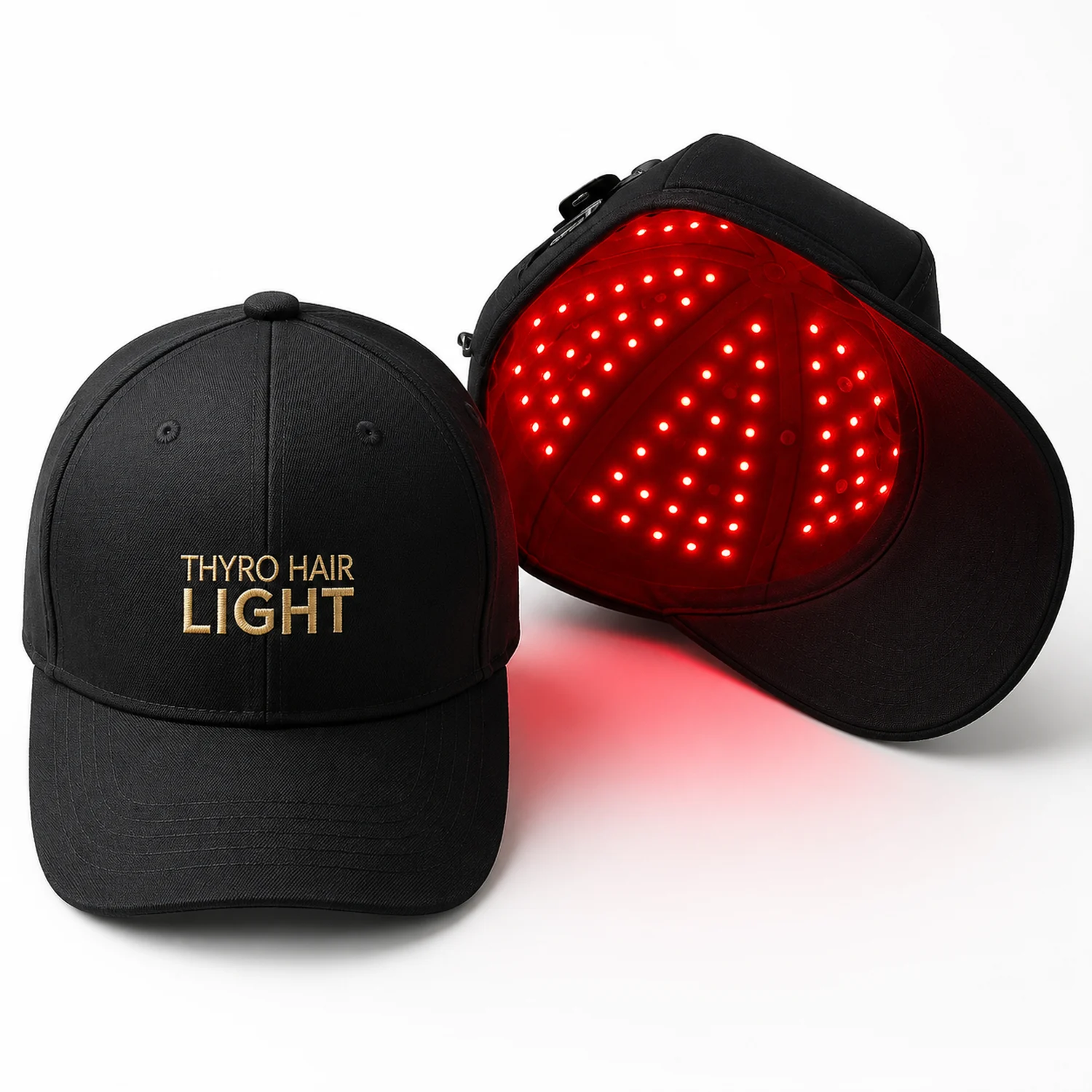
Check your device and parts
- Thyro Hair Light cap with rechargeable battery
- Charging cable
Keep the instructions and packaging that came with your cap. If a part is missing or looks damaged, contact us before use.
Get ready for your first session
1Charge, then unplug
Connect the supplied charging cable to the cap and a power source that matches the input rating on your device. Follow the charging directions supplied with your cap. Disconnect the charging cable before use.
2Start with a clean, dry scalp
Use your cap before applying hair oil or styling products. If oil or product is left on your scalp, wash it out and let your hair dry before the session.
3Put the cap on
Place the hat on your head with a snug fit so the LEDs sit close to your scalp. Adjust it for comfort without squeezing or forcing the fastenings. Move bulky hairstyles out of the way.
4Press the power button
Press the power button to start your 6-minute treatment. The device defaults to Mode 1, which we designed to work for most thyroid patients. For the optional pulsed setting, press and hold the power button for 3 seconds after selecting your mode. Let the session finish; the cap turns off automatically. Apply your hair oil or other non-prescription topicals afterward.
Choose your mode
Mode 1: for most users
9 J/cm² per 6-minute session
25 mW/cm² output in the standard setting.
We designed Mode 1 to work for most thyroid patients. Choose it as your usual starting mode. Press the power button to start.
Mode 2: lower intensity
5.4 J/cm² per 6-minute session
15 mW/cm² output in the standard setting.
Choose Mode 2 if you have a sensitive scalp or prefer a lower-intensity setting to start. Press the power button again to switch from Mode 1.
Want the gentler pulsed option?
Choose Mode 1 or Mode 2, then press and hold the power button for 3 seconds to activate pulse mode. This optional setting halves the light dose for a gentler session:
- Mode 1, pulsed: 4.5 J/cm² per 6-minute session.
- Mode 2, pulsed: 2.7 J/cm² per 6-minute session.
You can start with the standard setting. Choose the pulsed option when you prefer a lower-dose session.
J/cm² means joules of light energy per square centimeter. Both modes use all three wavelengths and a 6-minute session. The pulsed values are calculated at half the standard dose. If you develop burning, pain, or irritation, stop use instead of switching settings to continue.
Keep your sessions consistent
Per session, with automatic shutoff.
For the first 8–12 weeks, then 1–2 sessions a week for maintenance.
Pick days that fit your schedule. If you miss a day, resume your routine without doubling up.
Find the problem you see
My Hair Light won’t turn on.
- Connect the supplied charging cable securely to the cap and a compatible power source. Follow the input rating printed on your device.
- Let the battery charge according to the instructions supplied with your cap.
- Disconnect the charger, put the cap on, and press its power button.
- If it still won’t start, send us photos of the charging connection and device label. Don’t keep forcing the button.
It doesn’t seem to be charging.
Check the outlet, cable connections, and device input label. Try another working outlet. Don’t assume another device’s adapter is compatible just because its plug fits. If there’s still no charging response, contact us with a photo of the cable and labels.
It turns off after 6 minutes. Is that normal?
Yes. The cap has a 6-minute session timer and shuts off automatically. You don’t need to restart it for a second session. If it stops much earlier, charge the battery and try your next scheduled session. If early shutoff continues, contact us.
The battery doesn’t hold a charge.
If the cap can’t complete a 6-minute session after charging it as directed, contact us. Tell us how long it was charging, which power source you used, and how soon it shuts off. Stop using it if the battery area gets unusually hot, swells, smells unusual, or looks damaged.
Some lights look dim or appear to be off.
The cap uses visible red light plus near-infrared wavelengths that you can’t judge by eye. Some light sources may appear dim or unlit even when near-infrared is operating. Don’t stare into the LEDs to test them. If a section has changed or the cap isn’t working normally, send us a photo and the model label.
Which mode should I choose?
We designed Mode 1 to work for most thyroid patients. It delivers 9 J/cm² during a standard 6-minute session. Choose Mode 2 if you have a sensitive scalp or prefer a lower-intensity starting setting; it delivers 5.4 J/cm² during a standard 6-minute session. If you develop burning, pain, or irritation, stop using the cap instead of switching modes to keep going.
How do I switch modes or turn on the pulsed option?
Press the power button to start in Mode 1. Press it again to switch to Mode 2. To use the pulsed option, choose your mode, then press and hold the power button for 3 seconds. Pulse mode halves the light dose: 4.5 J/cm² in Mode 1 or 2.7 J/cm² in Mode 2 per 6-minute session. All three wavelengths operate together. If your controls look different, send us a photo so we can match the instructions to your cap.
The cap feels loose, tight, or won’t stay in place.
Adjust the cap so it sits close to your scalp without squeezing or causing pressure. Move bulky hairstyles out of the way. Don’t force the fit, pull hard on fastenings, or alter the cap. If the adjustment won’t hold or a strap or seam is damaged, send us a photo for help with the fit or replacement options.
Can I use hair oil, minoxidil, or styling products with it?
Use the cap on a clean, dry scalp, before applying hair oil or styling products. If oil or product is still on your scalp from the night before, wash it out and dry your hair before the session. For minoxidil or another prescribed topical, ask your prescriber how to coordinate use; don’t change prescribed treatment on your own.
My scalp burns or hurts after a session.
Stop using the cap. Burning or persistent pain isn’t a reason to push through or increase treatment. Contact your clinician about the symptoms and email us about the device. Don’t try another session to see whether it happens again.
I’m noticing more shedding or patchy hair loss.
Pause use and discuss new or worsening shedding with your clinician, especially if it comes with burning, pain, or changes to the scalp. There are several possible causes, and this guide can’t determine which one applies. Don’t assume worsening symptoms mean the device is working.
Can I use it after scalp injections or another procedure?
Ask the clinician performing the procedure when you can resume red light. This includes scalp injections, microneedling, and hair-transplant care. The waiting time depends on the treatment and how your scalp is healing; there isn’t one waiting period that fits everyone.
I missed a session. Should I double up?
Resume your regular schedule. Don’t add extra sessions or extend the 6-minute session to make up for a missed day.
I haven’t noticed a change yet.
Hair changes take time. Keep a record of your sessions and compare photos taken with the same lighting, angle, and hairstyle. Results vary, and a lack of visible change doesn’t by itself prove the cap is broken. For persistent or worsening hair loss, review the cause and treatment plan with your clinician.
Does the treatment schedule extend the return window?
No. The time needed to assess hair changes doesn’t automatically extend the return period. Check the return policy and your purchase date early, and contact us if you’re unsure which policy applies.
Can I use the cap with my Face Light or neck device?
Each device has its own controls and routine. Don’t copy another device’s session length onto the cap or swap charging parts unless compatibility is confirmed. Ask your clinician about combining treatments if you have a medical condition, symptoms, or a treatment plan.
Keep your device clean and dry
After each session
Turn the device off and disconnect it before cleaning. Use a clean, soft, dry cloth on the exterior. Follow the cleaning directions supplied with your model before using any cleaning solution. Don’t spray liquid into the device or its ports.
Between sessions
Keep the device and charging parts dry. Store them away from heat, humidity, and children. Don’t wash, soak, or fold the electronics, pull on the cable, or attempt a repair yourself.
Know when to pause
Check your medications and treatments
Ask your clinician before using red light if you have a condition or take medication that makes you sensitive to light. Don’t stop a prescribed medicine to use your device. Your clinician should also guide use around recent procedures or treatment for a skin or scalp condition.
Stop if it hurts
Stop using the device if you develop burning, pain, irritation, dizziness, or another new symptom. Contact your clinician about the symptom and our support team about the device. Don’t keep testing a damaged device or one that becomes unusually hot.
Follow any additional precautions supplied with your cap. If you’re pregnant, breastfeeding, considering use for a child, or receiving treatment for a scalp condition, get individual guidance from your clinician before starting.
Tell us what happens
Email hello@restartmed.com. Tell us which device you have and what happens when you try to use it.
- Your order number or receipt, purchase date, and seller.
- The charging cable and power source you’re using.
- What the lights or controller show, and when the problem starts.
- A photo of the connection, label, or damaged part. A short video can help with intermittent problems.
- The checks you’ve already tried.
You don’t need to repeat unsuccessful checks. Contact us about missing parts, replacement straps or cables, warranty questions, a gift, or a purchase from Amazon. Please wait for return instructions before mailing anything back.
Scientific References
American Academy of Dermatology: Is red light therapy right for your skin? Guidance on following device directions, eye protection, and medication-related light sensitivity.