Thyro Face Light guide
Your first session, your routine, and help when something isn’t working. Read the full guide right here.
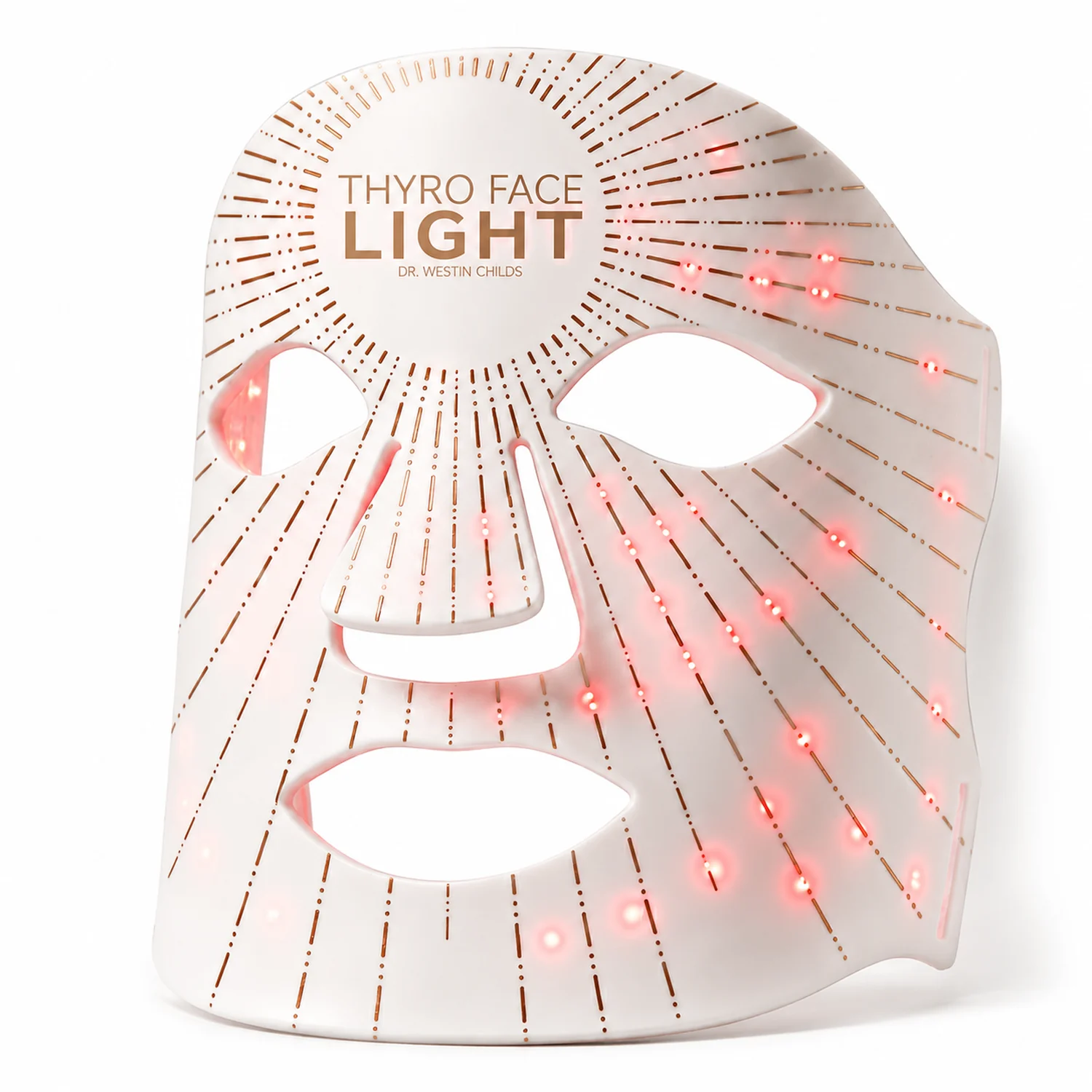
Check your device and parts
- Thyro Face Light mask
- Rechargeable controller
- 2 adjustable straps
- Charging cable and printed instructions
Check for the eye protectors described in your instructions. If they’re missing, contact us before using the mask on your face.
Get ready for your first session
1Charge the controller
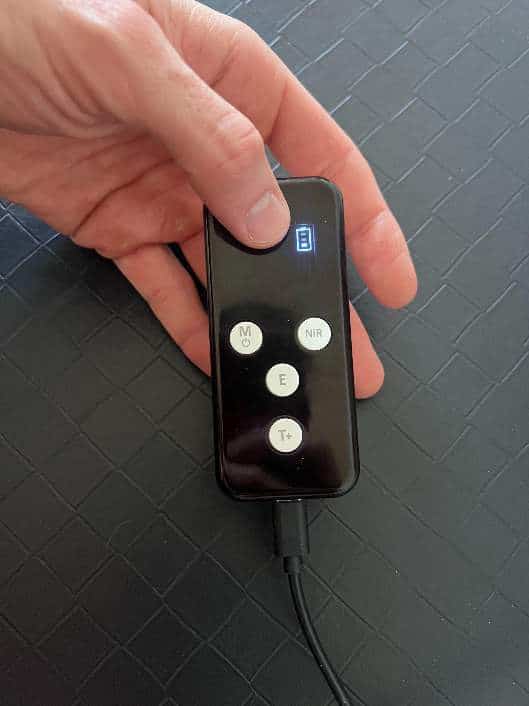
The small USB-C port at the bottom charges the controller. The larger USB-A port at the top connects to the mask. Check that the controller shows a charging indication.
Use the supplied charging cable and a power source that matches your controller’s input label. Unplug the charging cable when charging is finished.
2Remove the shipping film and test
Peel off only the removable dustproof shipping film. Before your first full session, the Face Light manual directs a 5-minute test on the inside of your wrist. If you notice redness, irritation, or discomfort, stop and contact your clinician before using it on your face.
3Prepare your skin and fit the mask
Start with clean, bare skin. Wash off makeup, sunscreen, and skincare products. Put the eye protectors in place as shown in your supplied instructions, then align the mask’s eye, nose, and mouth openings.
Thread the straps through the attachment slots and fold them back so the hook-and-loop surfaces meet. Adjust for a snug, comfortable fit without pulling tightly.
4Connect the mask and start
Connect the mask cable to the top USB-A port. Make sure the charging cable is unplugged, then press and hold M / power. The controller starts with a 10-minute timer.
Press NiR to add the fourth wavelength. Check the display for the NiR setting. Keep the controller supported with the buttons clear of pressure and slack in the cable. Stop if the light feels uncomfortable around your eyes.
Know your ports and buttons
Thyro Face Light uses the same remote as Thyro Light. The charging ports, power button, and screen indicators work the same way.
Two ports, two jobs
- Top
- The larger USB-A port connects to the mask.
- Bottom
- The smaller USB-C port charges the controller. Unplug it before a session.
Set your session
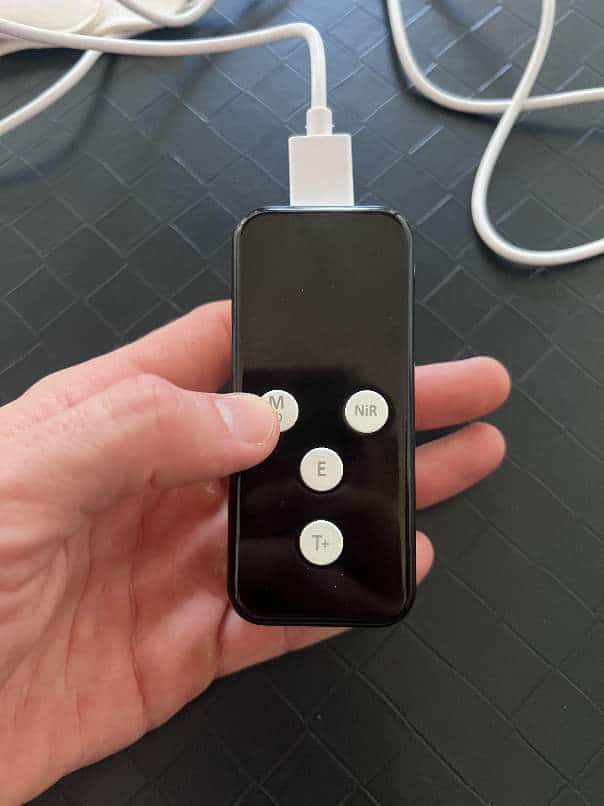
- M
- Press and hold to turn the controller on or off.
- NiR
- Adds the 850 nm near-infrared wavelength.
- E
- Adjusts the energy output.
- T+
- Adjusts the session timer.
Near-infrared light isn’t visible. Check the NiR indicator on the screen instead of looking for a change in brightness.
Check the screen
R means the red lights are on. NiR means near-infrared is on. The number shows the session time in minutes; the default is 10.
E shows the energy setting. The battery icon shows the remaining charge. A dark idle screen alone does not prove the battery is empty.
The lights turn off automatically when the selected timer ends. There is no end-of-session beep.
Press and hold to power on
3 to 5 sessions a week
Per session, with all four wavelengths. The controller starts at 100% output; use E to lower the output if needed.
You can also use it daily for 10 to 20 minutes.
After your session, remove the mask and apply your serum or moisturizer. Don’t add back-to-back sessions or increase the time to make up for a missed day.
Find the problem you see
My Face Light won’t turn on.
- Unplug the USB-C charging cable from the controller.
- Keep the mask cable plugged into the larger top USB-A port.
- Press and hold the M / power button.
- If nothing happens, recharge through the smaller bottom USB-C port, then unplug and try again.
- If it still won’t start, contact us with a photo of both connections and the controller display.
I charged it for hours, but the battery still seems empty.
First check the port. The larger top USB-A port powers the mask; it doesn’t charge the controller. Charge through the smaller bottom USB-C port and check for a charging indication. If it still won’t take or hold a charge through the correct port, contact us instead of repeatedly recharging it.
There is no charging indicator, or the battery bars are unclear.
Check that the charging cable is in the bottom USB-C port. Try a working outlet and a compatible charging cable and wall adapter that match the controller’s input label. A dark idle screen alone doesn’t prove the battery is empty. If the display stays unclear or no charging indicator appears, send us the controller label and a photo of the display.
How long should charging take, and how many sessions should I get?
Charging time and runtime depend on the controller and selected settings. If the first recharge fails or the battery drains unusually quickly, tell us the session length, energy setting, whether NiR is on, and which cable and adapter you used. Don’t keep repeating long charges or assume one fixed session count applies to every setup.
The mask lights come on when I try to charge it.
Switch it off and disconnect the mask. Charge the controller through its smaller bottom USB-C port. The top USB-A port is the mask connection, not a charging input. Once charging is finished, unplug the charging cable before reconnecting the mask for use.
Can I use it while it’s plugged into the charger?
No. The Face Light won’t turn on for a session while the controller is connected to its charger. Disconnect the charging cable from the controller. The mask cable stays connected during your session.
The controller turns on, but the mask stays dark.
Switch the controller off, then check that the mask’s cable is firmly connected to the top USB-A port. Disconnect the charging cable and press and hold M to restart. Don’t pull on or bend the cable to make it work. If a connection feels loose or the problem continues, contact us.
It shuts off during my session.
Shutoff when the selected timer ends is expected. If it stops sooner, check the battery and mask connection with the power off. Recharge, unplug, and try your next scheduled session. If it keeps stopping early or the controller loses charge unusually quickly, contact us.
M, NiR, E, or T+ won’t respond.
Unplug the charging cable and check that the mask is connected to the top USB-A port. Press and hold M to turn the controller on; a quick tap is different from a long press. Keep the controller supported with its buttons clear of pressure. If a button is stuck or stays unresponsive, contact us. Don’t force a button or open the controller.
There is no beep at the end.
This is normal for the shared Thyro Light controller. The lights turn off automatically when the selected timer ends; there is no end-of-session beep.
Power cuts out when I move the cable.
Turn the controller off and check the orientation of the mask connector, then gently reseat it once. Don’t force it or bend the cable to make the mask work. If the connection is loose, bent, or damaged, or power still cuts out when it moves, stop use and contact us with a photo.
NiR doesn’t look like it’s doing anything.
The 850 nm near-infrared wavelength isn’t visible to your eyes. Check for NiR on the controller display instead of looking for a brighter red glow. If the button doesn’t respond or the screen won’t show the setting, contact us. Don’t stare into the lights to test them.
The light is too bright around my eyes.
Stop the session. Check that the eye openings are aligned and that you’re using the eye protectors specified for your mask. If those are missing or the light is still uncomfortable, contact us before using it again. Don’t substitute sunglasses or a washcloth for the recommended protection. Eye pain, blurred vision, or a change in vision after use needs assessment by an eye-care professional.
The mask is too big, or it misses my chin and mouth area.
Loosen the straps and line up the eye, nose, and mouth openings before fastening it again. Secure it comfortably without pulling it tight. The openings don’t contain LEDs, and fit varies with face size. Don’t shift the mask over your eyes or cut it to reach another area. If you can’t get a comfortable fit, contact us for options.
I can’t attach the straps, or they keep slipping.
Check that each strap passes through the mask’s attachment slots and folds back so the hook-and-loop surfaces meet. The fastening surfaces should overlap securely without stretching the mask. If the straps arrived joined together, gently separate them first. Don’t cut them or force a seam apart. Send us a photo if the attachment still isn’t clear.
A strap is tearing or separating from the fabric.
Stop pulling on the damaged strap and contact us with a photo. Don’t glue, cut, or sew it onto the mask. We can help with replacement-part availability and warranty questions; you may not need to return the whole device.
Should I remove the clear film?
Remove the removable dustproof shipping film before first use. Don’t peel the permanent silicone surface or pull at the LEDs. If you can’t tell which layer is removable, send us a photo before peeling.
Can I use makeup, retinol, acids, or serums underneath?
Start with clean, bare skin. Wash off makeup, sunscreen, and skincare products before your session. Apply your serum or moisturizer afterward. If a product irritates your skin or your dermatologist has prescribed a treatment, ask them how to coordinate it with red light.
My skin feels hot, irritated, or uncomfortable.
Stop the session and remove the mask. Don’t continue through burning, pain, or irritation. Contact your clinician about ongoing symptoms and our team if the device seems unusually hot or damaged.
I’m taking doxycycline or another medicine that can cause light sensitivity.
Don’t use the mask while taking medication that causes photosensitivity. Ask your prescriber or pharmacist whether your medication has that effect and when red light can be resumed. Don’t stop the medication or guess a waiting period from this guide.
I’ve had precancerous spots, skin cancer, or a recent skin procedure.
Ask your dermatologist whether and where you can use the mask before starting. The answer depends on your history, the area being treated, and any current treatment. Don’t use the mask to treat an unexplained or changing lesion.
Can I use it with the neck light, a panel, or a massager?
Follow each device’s own instructions. Ask your clinician before combining treatment over the same area or after a procedure. Don’t assume a neck massager is suitable for the face or that similar-looking controllers are interchangeable; send us the model labels for compatibility help.
Can I miss a day or do extra sessions?
If you miss a day, resume your regular schedule. Don’t double the time or add back-to-back sessions to catch up. More treatment isn’t automatically better.
Can this treat thyroid eye disease, jaw problems, or hair loss?
Use the Face Light as a facial skincare device. Ask the clinician treating an eye, jaw, thyroid, or hair-loss condition about that condition’s treatment. Don’t reposition the mask over your eyes or use it as a substitute for medical care.
Keep your device clean and dry
After each session
Turn the device off and disconnect it before cleaning. Use a clean, soft, dry cloth on the exterior. Follow the cleaning directions supplied with your model before using any cleaning solution. Don’t spray liquid into the device or its ports.
Between sessions
Keep the device and charging parts dry. Store them away from heat, humidity, and children. Don’t wash, soak, or fold the electronics, pull on the cable, or attempt a repair yourself.
Know when to pause
Check your medications and treatments
Ask your clinician before using red light if you have a condition or take medication that makes you sensitive to light. Don’t stop a prescribed medicine to use your device. Your clinician should also guide use around recent procedures or treatment for a skin or scalp condition.
Stop if it hurts
Stop using the device if you develop burning, pain, irritation, dizziness, or another new symptom. Contact your clinician about the symptom and our support team about the device. Don’t keep testing a damaged device or one that becomes unusually hot.
The Face Light manual advises against use during pregnancy, while breastfeeding, or by children. It also advises against use with known light sensitivity or medications that cause photosensitivity. If you have a thyroid condition or are receiving medical or dermatological treatment, consult your healthcare provider before use.
Tell us what happens
Email hello@restartmed.com. Tell us which device you have and what happens when you try to use it.
- Your order number or receipt, purchase date, and seller.
- The charging cable and power source you’re using.
- What the lights or controller show, and when the problem starts.
- A photo of the connection, label, or damaged part. A short video can help with intermittent problems.
- The checks you’ve already tried.
You don’t need to repeat unsuccessful checks. Contact us about missing parts, replacement straps or cables, warranty questions, a gift, or a purchase from Amazon. Please wait for return instructions before mailing anything back.
Scientific References
American Academy of Dermatology: Is red light therapy right for your skin? Guidance on following device directions, eye protection, and medication-related light sensitivity.